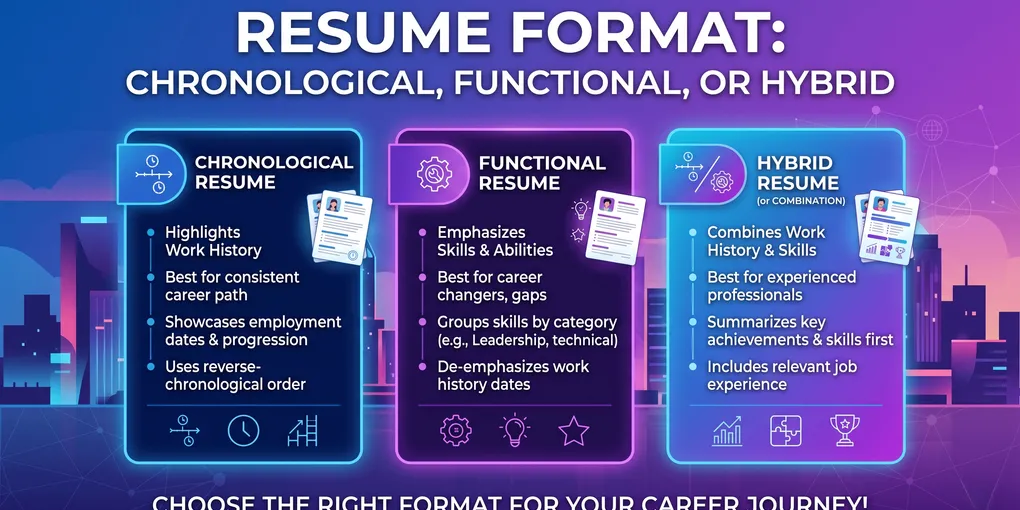
Resume Format: Chronological, Functional, or Hybrid
Two candidates with identical experience apply for the same job. One gets the interview. The difference is not the work — it is the order the work is presented in. One resume opened with a dated job history a recruiter could scan in four seconds. The other buried the timeline under a wall of “Key Skills” and got filed under “what are they hiding?”
That is what resume format decides: not what you say, but how fast a busy recruiter and an automated parser can find it. Pick the wrong structure and strong experience reads as confusing. Pick the right one and average experience reads as a clear, qualified candidate.
This guide breaks down the three resume formats — chronological, functional, and hybrid — shows you exactly what each looks like, and tells you which to use based on your actual situation.
TL;DR — Which Resume Format to Use
- Reverse-chronological — the default. Best for ~80% of people, including anyone with a steady work history. Recruiters expect it; ATS parses it cleanly.
- Functional (skills-based) — almost never. It hides your timeline, triggers recruiter suspicion, and confuses many parsers. Skip it.
- Hybrid (combination) — for career changers, big gaps, or skills-heavy roles. Leads with skills but keeps a dated history below.
- The layout matters as much as the type: single column, standard headings, no graphics, real text — or the ATS drops your content regardless of format.
The Three Resume Formats at a Glance
There are three structures. Everything else (templates, colors, columns) is decoration on top of one of these.
| Format | What goes first | Best for | ATS-safe? |
|---|---|---|---|
| Reverse-chronological | Work history, newest role first | Steady careers, climbing the same field | ✅ Yes |
| Functional (skills-based) | Grouped skills; dates minimized | Almost no one (rare freelance/portfolio cases) | ⚠️ Often mis-parsed |
| Hybrid (combination) | Summary + key skills, then dated history | Career changers, gaps, senior generalists | ✅ Yes, if formatted well |
The decision is mostly between chronological and hybrid. Functional is on the list because people still reach for it when they are nervous about a gap — and it usually backfires.
Action step: Before picking a template, decide which of these three you need. The template comes second.
Reverse-Chronological — The Default That Usually Wins
The reverse-chronological format lists your work experience from most recent to oldest, with dates, titles, and company names up top after a short summary. It is the format recruiters are trained on and the one applicant tracking systems parse most reliably.
Why it works: a recruiter’s first question is “what have you been doing lately, and for how long?” This format answers it in the first four seconds. Anything that delays that answer costs you attention.
❌ Weak (no dates, no progression):
Experience Marketing work across several companies. Responsible for campaigns, social media, and reporting.
✅ Strong (chronological, scannable):
Senior Marketing Specialist — Northwind SaaS · Jan 2023–Present
- Grew organic signups 42% in 12 months by rebuilding the content funnel
Marketing Specialist — Brightline Agency · Jun 2020–Dec 2022
- Managed 6 client accounts; lifted average email CTR from 1.8% to 3.1%
The second version shows progression, recency, and tenure at a glance — the exact signals a recruiter is scanning for.
Use it if: you have a consistent work history in one field, or you are moving up the same ladder. That is most job seekers.
Action step: If nothing in your situation forces a different choice, default to this. Then read how to write a resume from scratch to fill each section.
Functional (Skills-Based) — Why Recruiters Distrust It
The functional format groups your accomplishments under skill headings (“Leadership,” “Project Management”) and pushes the dated work history to a thin list at the bottom — or removes dates entirely.
It sounds appealing when you have a gap or a thin history. The problem: recruiters know exactly why people use it. A 2020s recruiter sees a functional resume and assumes you are hiding a gap, a short tenure, or a lack of relevant roles. You created suspicion before they read a word.
It also breaks the machines. Many ATS parsers map achievements to the job and date where they happened. Strip the connection between a skill and a role, and the parser can drop or scramble the content.
❌ Functional (skills floating with no context):
Key Skills Leadership — Led teams to hit targets. Communication — Presented to senior stakeholders.
Experience Various roles, 2016–2024.
A recruiter cannot tell where you led, what you led, or for how long. “Various roles” reads as a warning sign.
Use it if: almost never. The narrow exception is a portfolio-driven freelancer where projects matter more than employers — and even then, a hybrid does the job better.
Action step: If a gap is the reason you are reaching for functional, don’t. Use a hybrid (next) and address the gap directly in your summary instead.
Hybrid (Combination) — Best for Career Changers
The hybrid format opens like a functional resume — a summary plus a “Core Skills” or “Relevant Achievements” block — then keeps a full, dated reverse-chronological history below. You get the skills emphasis without hiding the timeline.
This is the right tool when your most recent job title does not match the role you want. It lets you front-load transferable skills so the recruiter sees fit immediately, while still proving a real, traceable career.
❌ Pure chronological for a career switcher (buries the fit):
Experience Restaurant Manager — Olive & Vine · 2019–2025
A recruiter hiring for a project coordinator role sees “Restaurant Manager” and moves on, never learning you ran scheduling, budgets, and vendor logistics for a 30-person team.
✅ Hybrid (leads with the transferable angle):
Summary Operations professional moving into project coordination. 6 years running budgets, vendor contracts, and 30-person schedules in high-pressure environments.
Core Skills Budget management · Vendor negotiation · Scheduling software · Team coordination
Experience Restaurant Manager — Olive & Vine · 2019–2025
- Cut food-cost variance from 9% to 4% by rebuilding the ordering workflow
Now the relevant skills land first, and the dated history backs them up instead of contradicting them.
Use it if: you are changing careers, returning after a gap, or you are a senior generalist whose value is a mix of skills rather than one linear track. To make the skills block land, learn how to find and mirror the target job’s keywords so your transferable skills match what the role actually asks for.
Action step: Write a 2–3 line summary naming the role you want, then list the 4–6 transferable skills that prove you fit it — before touching your job history.
How to Choose — By Your Situation
Format is not a style preference; it is a response to your specific history. Match your situation to the format.
| Your situation | Use this format | Why |
|---|---|---|
| Steady history, same field | Reverse-chronological | Shows progression; what recruiters expect |
| Climbing the ladder, recent promotion | Reverse-chronological | Recency and tenure are your strongest signals |
| Changing careers | Hybrid | Front-loads transferable skills, keeps real timeline |
| Returning after a gap | Hybrid | Leads with skills; address the gap in the summary |
| Student or no work experience | Chronological/Hybrid | Fill with projects, education, internships |
| Freelancer/portfolio-driven | Hybrid | Group projects, still show a timeline |
Notice functional is on none of these rows. There is almost always a better choice.
Action step: Find the row that matches you, lock the format, and stop second-guessing it. Spend the saved energy on the content.
Formatting Rules That Keep Any Format ATS-Safe
The format type decides the order of information. The layout decides whether a machine can read it at all. A brilliant hybrid resume in a two-column graphic template can score zero if the parser can’t read the columns.
Most large employers screen resumes through software before a human sees them — the same tools recruiters use to search and filter candidates. Format for the machine first, then the human.
Layout rules that hold for every format:
- Single column. Multi-column and sidebar layouts get read out of order by many parsers.
- Standard section headings. Use “Experience,” “Education,” “Skills” — not “Where I’ve Made Impact.” Parsers look for the known labels.
- Real text, not images. No skills inside graphics, icons, or text boxes. If it’s a picture, the ATS can’t read it.
- Simple fonts, 10–12pt. Arial, Calibri, Georgia. Skip decorative fonts.
- Standard dates. “Jan 2023–Present” in a consistent format the parser recognizes.
- Save as PDF unless the posting asks for .docx, and name the file with your name and the role.
This is also where keyword placement pays off — see how to find and place resume keywords so your chosen format carries the terms the parser scores.
Action step: Open your draft and strip anything in a column, image, or text box. If a parser can’t read it as plain text, it isn’t on your resume.
Common Resume Format Mistakes
Even the right format gets undone by execution errors. These are the ones that quietly sink otherwise strong resumes — and they overlap with the patterns in our resume mistakes guide.
- Choosing functional to hide a gap. It advertises the gap instead. Use hybrid and name it briefly.
- Cramming two formats at once. A confused structure (half chronological, half skills, no clear order) reads worse than either done cleanly.
- Creative templates for conservative fields. A designer’s two-column color resume can work in design; it fails in finance, law, and most corporate roles — and in the ATS.
- No summary at the top. Every format benefits from a 2–3 line opener. See resume summary examples for openings that set up the format.
- Inconsistent formatting. Mixed date styles, fonts, and bullet shapes signal carelessness in four seconds.
Action step: After formatting, do one read purely for consistency — dates, fonts, bullets, spacing — before you read for content.
Resume Format Checklist
Run this before you submit:
- Picked one clear format that matches your situation (not functional unless truly exceptional)
- Reverse-chronological work history with newest role first (or a hybrid that still shows dates)
- Short summary at the top — 2–3 lines naming the target role
- Single-column layout, no sidebars or graphic text boxes
- Standard section headings: Experience, Education, Skills
- Consistent fonts (10–12pt), dates, and bullet style throughout
- All content is real text — nothing trapped in images or columns the ATS can’t read
- Saved as a PDF named with your name and the role
FAQ
Q: What is the best resume format? A: For most people, reverse-chronological. It shows recency and progression, matches what recruiters expect, and parses cleanly through ATS. Use hybrid only for a career change or non-linear history.
Q: Is a chronological or functional resume better? A: Chronological, in almost every case. Functional hides your timeline, which recruiters read as a red flag and many parsers mishandle. If you’re worried about a gap, use a hybrid instead.
Q: What resume format do recruiters prefer? A: Reverse-chronological. It answers their first question instantly — what you’ve done lately and for how long — and a clean single-column version ranks better in ATS search than a creative layout.
Q: Which resume format is best for a career change? A: A hybrid format. It opens with a skills-focused summary and transferable-skills block, then still shows a dated history — reframing your background without hiding your timeline.
Q: Is a functional resume bad for ATS? A: Often yes. Splitting skills from the roles where you used them confuses parsers that map achievements to dated jobs, and it raises recruiter suspicion. A hybrid gets the emphasis without the risk.
Q: What resume format should someone with no experience use? A: Chronological or hybrid, with the experience section filled by education, projects, internships, and volunteering. A pure functional resume looks like you’re hiding something even when you aren’t.
Final Thoughts
Resume format is a routing decision, not a design choice. Reverse-chronological for a steady history, hybrid when you need to reframe a switch or a gap, and functional almost never. Whichever you pick, keep the layout single-column and machine-readable so the structure you chose actually survives the parser. Get this right and your real experience finally reads the way it deserves to.
Once your format is set, the next question is usually how much to put in it — work through how to write a resume from scratch to fill each section with the right depth.
Ready to skip the formatting headache entirely? Build your resume on CV-Mate — every template is single-column, ATS-safe, and ready in any format you need, or browse resume examples to see each format in action.
Ready to build your resume?
You've got the knowledge. Now put it into action—create a professional resume in under 10 minutes with our builder.
No credit card required · Export as PDF · ATS-friendly templates