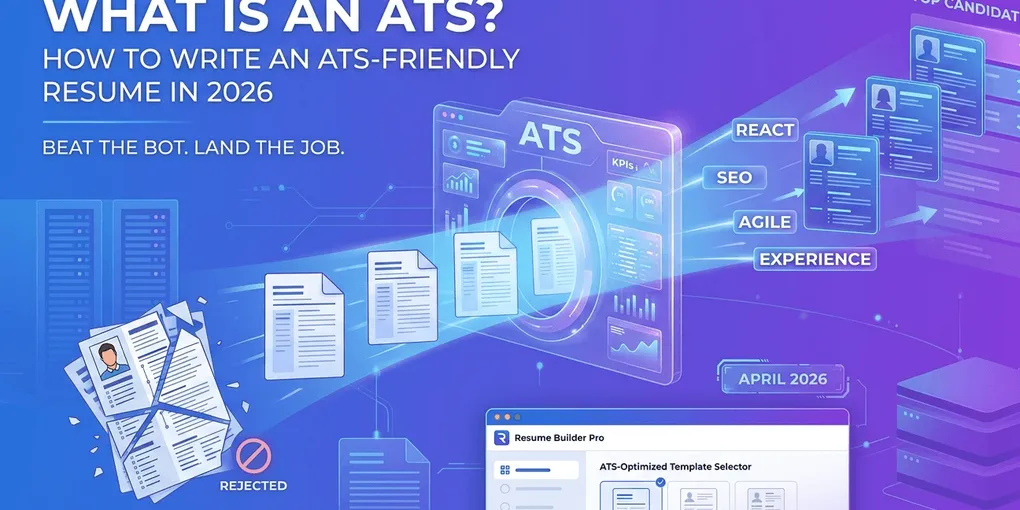
What Is ATS and How to Write a Resume That Passes It
You spent three hours tailoring a resume. You hit “Apply.” You never heard back. Most people blame the recruiter. The truth is uglier: a piece of software decided you were not worth a human’s ten seconds — and it did so before any human knew you existed.
That software is the Applicant Tracking System (ATS), and roughly 75% of mid-to-large employers run every résumé through one before a recruiter opens a single file. The system is not malicious. It is just literal: it matches strings, scores fit, and ranks. If your resume is unreadable to the parser, you do not exist.
This guide explains exactly what ATS does, where most resumes lose points, and the formatting plus keyword rules that get yours into the shortlist a recruiter actually sees.
TL;DR — The Short Version
- ATS rarely auto-rejects. It ranks. A low score means recruiters never scroll to your name.
- Format simply. Single column, standard headings, no text-in-image, text-based PDF or .docx.
- Match the language of the job description. Use the exact words (“Project Manager,” “Salesforce”) — not synonyms.
- Place keywords where ATS weighs heavily: title, summary, first bullet of each role, skills section.
- Aim for 15–25 distinct keywords. Stuff beyond that and the human reviewer will reject you instead.
What Is an ATS, Really
An Applicant Tracking System is the software employers use to receive, store, parse, search, and rank job applications. Think of it as the gatekeeper between the “Apply” button and the recruiter’s inbox.
When you upload a resume, three things happen in under a second:
- Parsing. The ATS extracts text and tries to slot it into structured fields: name, contact, work history, education, skills.
- Keyword matching. It scans for the exact words and phrases the recruiter (or the system’s job-template) flagged as required or preferred.
- Scoring. It assigns a fit score, typically 0–100, and orders all applicants for that role.
The recruiter then opens the system, filters by required keywords or by score, and reviews the top 20–50 names. The other 200+ applicants are technically still in the database — but practically invisible.
The most common ATS platforms today are Workday, Greenhouse, Taleo (Oracle), iCIMS, Lever, SmartRecruiters, and Bamboo HR. They differ in detail, but the parsing rules below apply to all of them.
Action step: Find out which ATS your target employer uses (a quick LinkedIn search of “[Company] careers” or the URL of their job page usually reveals it). Knowing the platform lets you avoid known parsing quirks.
What ATS Actually Does (And Does Not Do)
A lot of resume advice online treats ATS as a black box monster. It is not. It is a parser plus a search engine. Knowing the difference between what it really does and what people think it does saves you from chasing fake fixes.
| Myth | Reality |
|---|---|
| ”ATS rejects you if you miss a keyword.” | It lowers your rank. A recruiter still controls the cut line. |
| ”ATS reads your soft skills.” | Most score soft skills near zero. Show them through results, not labels. |
| ”Hiding white keywords in white text tricks ATS.” | Modern parsers strip formatting and flag stuffing. Recruiters see the whole text. |
| ”PDFs are always safe.” | Text-based PDFs are. Image-exported “designer” PDFs are not. |
| ”ATS reads photos and graphics.” | They are stripped or ignored. A skill listed only inside a graphic does not exist to the system. |
The single most important reframe: ATS is not deciding whether you are qualified. It is deciding whether the recruiter ever finds out you applied.
Action step: Stop trying to “beat” the ATS. Treat it as the first reader and write so a literal-minded reader can confirm fit in 5 seconds.
Why Most Resumes Fail the ATS
In our review of resumes submitted to CV-Mate, four issues account for the vast majority of low ATS scores. Each one is fixable in under 15 minutes.
1. Unparseable Layout
Two-column layouts, fancy templates from Canva, sidebars with skills inside them, text rendered as part of an image — all of these trip up parsers. Workday and Taleo are particularly aggressive at flattening multi-column documents into a single text stream, which means your skills sidebar may end up randomly inserted between job descriptions.
❌ Bad: A two-column Canva template where the left column has skills and dates, and the right column has job descriptions.
✅ Fixed: Single-column layout. Standard section headings (“Experience,” “Education,” “Skills”). One job per block, dates on the same line as the title.
2. Non-Standard Section Headings
The parser is looking for known labels. “Career Adventures” is creative. “Experience” gets you parsed correctly.
❌ Bad: “What I’ve Built,” “My Journey,” “Skill Stack.”
✅ Fixed: “Experience” or “Work Experience,” “Education,” “Skills,” “Certifications.”
3. Missing Job-Description Keywords
The job posting says “Project Manager.” Your resume says “Coordinated cross-functional teams.” Both are accurate. Only one matches. ATS does literal string matching. The short version: the exact phrasing of the job description is the language the ATS expects you to mirror.
❌ Bad: “Led launches across product, design, and engineering.” (Job posting wanted “Project Manager.”)
✅ Fixed: “Project Manager — led launches across product, design, and engineering.”
4. File and Format Choices That Confuse the Parser
A resume exported from Figma or InDesign as a PDF is often a single image — the parser sees nothing. Files saved as .pages, .rtf, or scanned PDFs frequently fail upload validation. Filenames with spaces or accented characters sometimes break in older systems.
❌ Bad: “Résumé Final v3.pages” exported from a designed Figma frame.
✅ Fixed: “FirstName-LastName-Resume.pdf” — a text-based PDF exported from Word, Google Docs, or a builder that produces machine-readable text.
Action step: Open your current resume PDF, press Ctrl+A to select all, then Ctrl+C and paste into a plain text document. If anything is missing, malformed, or out of order, the ATS sees the same broken version.
The ATS-Friendly Resume Format
There is no single “ATS template.” There is a format that parses cleanly across every major system. Use this skeleton.
| Section | Format rule | Why it matters |
|---|---|---|
| Header | Name, city + state, email, phone, LinkedIn URL on separate lines | Headers and footers in Word can be skipped by some parsers — keep contact in the body |
| Professional Summary | 3–4 lines, contains job title + 2–3 hard skills | High keyword weight; first thing the human reads too |
| Experience | Job title • Company • Dates on one line, then 3–5 bullets | Title-Company-Date pattern is what parsers expect |
| Skills | Comma-separated or simple list, mix of hard skills and tools | Easy keyword match; do not embed in graphics |
| Education | Degree, institution, graduation year | Some ATS gate on degree level — keep it parseable |
| Certifications | Acronym + full name, year | Many ATS filters search certifications by acronym (PMP, AWS) |
Avoid: text boxes, tables for layout (tables for data are fine), images that contain text, headers/footers for important info, two-column layouts, custom fonts that may not embed, and emojis.
For a deeper breakdown of layout choices, chronological, functional, or hybrid each parses differently and signals different things to recruiters.
Action step: Run your resume through a free text-extraction test (paste-into-notepad works). The output should look like a clean, ordered, top-to-bottom version of your resume, not a jumbled mess.
How to Use Keywords Without Stuffing
Keywords are the fuel of ATS scoring, but they are also the fastest way to look like a spammer to the human who reads next. The line is finer than most people realise.
Where Keywords Earn the Most Points
- Job title line — direct title matches double or triple your score in many ATS configurations.
- Professional summary — 2–3 sentences containing the role, years of experience, and 2–3 hard skills.
- First bullet under each role — high weight, also catches the recruiter’s eye.
- Skills section — pure keyword zone; list 10–15 hard skills and tools.
Where Keywords Are Wasted
- A footer line that says “Keywords: Python, Salesforce, Excel.”
- A “skills cloud” graphic.
- A buried mention deep in your sixth job from 2014.
How to Avoid Stuffing
- 15–25 distinct keywords total. Repeating the same keyword 8 times is stuffing.
- Use both acronym and full term once (“Search Engine Optimization (SEO)”) — covers either ATS query.
- Match exact phrasing. “Project Management” is one keyword. “Managing projects” is another. The ATS often does not equate them.
- Stay honest. Do not list a skill or tool you cannot defend in an interview. ATS gets you in the door; the human keeps you there.
For the full keyword-extraction workflow, the process starts with the job description — pull every repeated noun and must-have tool from the posting.
Action step: Take your three most recent applications. For each, build a 15–25-keyword list pulled from the job description, then place each keyword in one of the four high-weight zones above.
Common ATS Mistakes That Cost You the Interview
Most rejected resumes lose at the same handful of details. We listed the broader pattern in our guide to the most common resume mistakes that get you rejected, but these are the ATS-specific ones to fix today.
❌ Storing your name and contact info in the header/footer of the Word document. Some ATS strip headers. The recruiter ends up with a nameless resume in the queue.
✅ Move name, email, and phone into the body of the document, top of page one.
❌ Tabs and spaces used to fake columns. When the parser flattens, your perfectly aligned dates collapse into the middle of a job title.
✅ Use a real single-column layout. Dates go on the same line as the role, separated by | or –.
❌ Job titles people inside the company use, but the market does not. “Growth Wizard” reads as nothing to a parser searching for “Growth Marketing Manager.”
✅ Use the standard market title in your resume; you can keep the playful internal title in your portfolio or LinkedIn About section.
❌ One generic resume for every role. The ATS scores fit per job. A 70%-match generic beats a 90%-match tailored only when no tailored applicants applied — which is rare.
✅ Spend 10 minutes per application aligning the summary, the first bullet of each role, and the skills section to the posting.
Action step: Pick the last three roles you applied to. Re-score each resume against the job description: how many of the top 10 keywords actually appear, verbatim, in the high-weight zones? If under 7, the ATS likely never surfaced you.
Test Your Resume Before You Send
You do not need expensive software to know whether your resume parses. Do these three checks before every submission.
- Plain-text test. Open the PDF, select all, copy, paste into a text editor. Read it top to bottom. Sections in order? Dates next to titles? Bullets readable? If yes, the ATS sees the same.
- Keyword check. Open the job description side by side. Highlight the must-have terms. Does each appear at least once in your resume, in the exact wording? If a term is missing, decide: edit it in honestly, or skip the application.
- AI review. A targeted review tool tells you what the ATS sees and what is missing. CV-Mate’s AI resume review checks parsing, keyword fit against the job description, and structure issues — in under a minute.
Skipping these steps is the #1 reason qualified candidates get filtered out. It is also the cheapest fix in the entire job search.
Action step: Run your current resume through all three checks before your next application. If two of three flag issues, rewrite before submitting — do not just hit send.
Frequently Asked Questions
Does the ATS automatically reject my resume? Almost never. Most ATS platforms rank and score rather than auto-reject. A low score means a recruiter is unlikely to see you in the shortlist, but a human still controls the final filter. Outright auto-reject only happens on hard knockout questions like work authorization or required licenses.
Should my resume be a PDF or Word document for ATS? Both work in modern ATS, but a text-based PDF is the safest default. Avoid scanned PDFs, image-only files, or documents created by exporting a designed canvas to PDF, since these often parse as a single image with no readable text.
Do ATS systems read graphics, columns, or tables? Many still struggle with multi-column layouts, text inside graphics, and complex tables. Single-column layouts with standard section headings parse cleanly across every major ATS, including Workday, Greenhouse, Taleo, iCIMS, and Lever.
How many keywords does an ATS-friendly resume need? Aim for 15 to 25 distinct keywords drawn from the job description, spread across your summary, experience bullets, and skills section. Past that range, you tip into stuffing, which lowers your readability score with the human reviewer without raising your ATS score.
Will the ATS understand acronyms and full terms? Not reliably. List both the acronym and the spelled-out form on first use, for example “Search Engine Optimization (SEO).” That way you match whichever variant the recruiter searched for in the ATS.
Is a one-page resume better for ATS? Length does not affect ATS parsing — the system reads every page. The one-page rule is for human attention, not for software. With under 10 years of experience, one page is still the standard; beyond that, two pages are fine if every line earns its place. For a deeper take, our guide to how to write a resume from scratch walks through length and structure together.
The One Takeaway
ATS is not your enemy. It is a literal-minded first reader. Format your resume so a parser can read it cleanly, mirror the language of the job description in the high-weight zones, and stay honest about what you can defend in an interview. Do that, and you stop losing applications to a piece of software you cannot see.
If you want to skip the formatting guesswork, build an ATS-friendly resume in CV-Mate — every template parses cleanly across Workday, Greenhouse, and Taleo, and the editor warns you when something would trip the parser. Then run AI resume review against the job description before you hit send.
Next step: Pick the role you most want, pull the top 15 keywords from its job description, and rewrite your summary plus first bullets to match. That single hour does more than another fifty generic applications.
Ready to build your resume?
You've got the knowledge. Now put it into action—create a professional resume in under 10 minutes with our builder.
No credit card required · Export as PDF · ATS-friendly templates