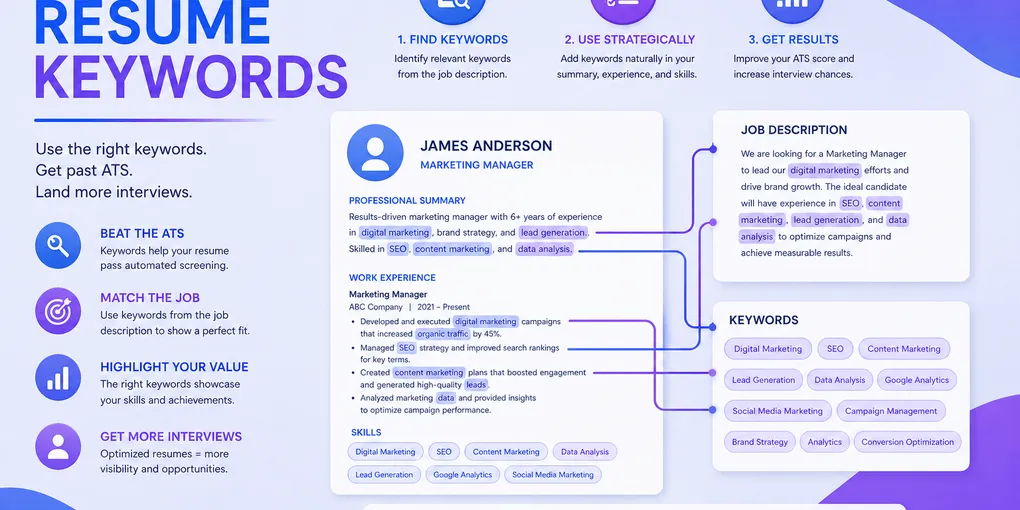
Resume Keywords: How to Find and Use Them for Any Job
You sent the resume. The job description said “Salesforce.” You wrote “CRM experience.” The ATS never matched you — and the recruiter never saw your name.
Most rejection at the keyword layer is not about being underqualified. It is about the exact words on the page. ATS parsers match strings, not meaning, and the average corporate recruiter spends under 10 seconds scanning the shortlist that parser produces. Get the keywords wrong and you lose the chance to be read.
This guide shows you how to pull the right keywords from any job description, where to place them so they actually count, and how to use them without sliding into keyword stuffing that hurts you with the human reader on the other side.
TL;DR — The Short Version
- Keywords are strings, not synonyms. Match the exact wording of the job description where possible.
- Pull from three places: the “Requirements” block, the repeated nouns in the job description, and the job title itself.
- Place them where the ATS weighs heavily: job title line, professional summary, the first bullet under each role, and a dedicated skills section.
- Target 15–25 distinct keywords. More than that reads like spam; fewer than that lowers your match score.
- Never stuff. The ATS ranks, but a human makes the call — they will reject a keyword-salad resume.
What Counts as a Resume Keyword
A resume keyword is any word or short phrase an employer uses to identify a qualified candidate. In practice they fall into four buckets, and knowing which bucket matters for how you use them.
| Keyword type | Example | Why it matters |
|---|---|---|
| Job title | ”Product Manager,” “Senior Data Analyst” | Weighted highest by most ATS; a direct title match can double your ranking score |
| Hard skill / tool | ”Python,” “Salesforce,” “Google Analytics” | Easy to match literally; often appears in the ATS’s must-have filter |
| Certification / framework | ”PMP,” “Scrum,” “ISO 27001” | Binary — you either have it or you don’t; high weight when listed as required |
| Domain / methodology | ”Agile,” “B2B SaaS,” “supply chain” | Signals fit; lower weight individually but strong in aggregate |
Soft skills — “communication,” “team player,” “problem solver” — are keywords in theory, but most recruiters skip past them and most ATS scoring weights them near zero. Show soft skills through results (“Led weekly stakeholder sync for 3 engineering teams”), not labels.
Action step: Grab the last job description you applied to. Highlight every term that falls into one of the four buckets above. That is your real keyword list — everything else is filler.
Where to Find the Right Keywords
Finding keywords is a five-minute job if you know where to look. Do not guess. Do not use generic “top resume keywords” lists — those are written for traffic, not for your job.
1. The “Requirements” or “Qualifications” Block
This is the single most important source. Anything listed here is a keyword the employer has explicitly said they want. Copy-paste the whole block into a separate doc, then strip it down to nouns and tool names.
2. Repeated Terms in the Full Job Description
Words that appear 3+ times in the posting are almost always weighted by the ATS. If “stakeholder management” shows up in the summary, the responsibilities list, and the requirements, it is a must-include — not a nice-to-have.
Paste the full posting into a word-frequency tool (Wordcounter, or even a quick ChatGPT “count the noun phrases that appear more than twice” prompt). The top 10–15 nouns are your core keyword set.
3. The Job Title Itself
If the role is “Senior Product Manager, Growth,” you need the words “Product Manager” somewhere in your experience block — ideally as a literal job title for one of your past roles or in your professional summary. “Led the product team” does not match “Product Manager.”
4. LinkedIn Profiles of People Already in the Role
Search LinkedIn for people currently holding the exact title at similar-sized companies. The words they use to describe their work are the words the market uses for that role. You will see patterns — the same 5–8 tools, the same methodology names — that you should mirror if they honestly apply to you.
Action step: For your next application, build a keyword list of 15–25 terms using sources 1–3 before you even open your resume. Keep it beside you while you edit.
Where to Place Keywords (And Where They Are Wasted)
Placement matters almost as much as which keywords you pick. Most ATS parsers weight sections differently.
High-weight placements (do these first)
- Job title line — If your title was “Marketing Specialist” but the job description keeps saying “Digital Marketing Manager,” consider adding a descriptor: “Marketing Specialist (Digital Marketing focus).” Do not fabricate a title — align it honestly.
- Professional summary — 2–3 keywords in the first two sentences. This is prime ATS real estate and the first thing a recruiter reads.
- First bullet of each role — parsers and humans both skim the opening bullet. Put the highest-weight keyword there.
- Dedicated skills section — list 10–20 tools and hard skills as a simple comma-separated block or a two-column list. Avoid tables or graphics.
Low-weight placements (do not rely on these)
- Headers and footers (many ATS skip them entirely)
- Inside images, icons, or graphic text boxes (parsers cannot read them)
- Cover letter only (the ATS reads the resume first; cover letter keywords rarely move the resume’s score)
- A “Related interests” or “Other” section at the bottom
Before and After — Professional Summary
Job posting: “Customer Success Manager, B2B SaaS, Salesforce, HubSpot, 5+ years, churn reduction.”
❌ Weak (no keywords):
“Experienced customer-facing professional with a passion for helping clients succeed and building long-term relationships.”
✅ Strong (targeted keywords woven in):
“Customer Success Manager with 6 years in B2B SaaS, reducing churn by 18% across a $4M book of business using Salesforce and HubSpot playbooks.”
The second version matches the title, the industry, both tools, the years-of-experience filter, and the outcome term (“churn”) — five high-weight matches in 28 words.
Before and After — Experience Bullets
Same posting, same candidate, same actual job. Different keyword density.
❌ Before:
- Worked closely with clients to make sure they were happy
- Helped with the CRM and gave training to the team
- Reduced the number of customers leaving the product
✅ After:
- Owned 80+ B2B SaaS accounts in Salesforce, cutting quarterly churn from 9% to 7.4%
- Ran HubSpot onboarding playbooks for new hires; 5 reps ramped in under 30 days
- Built customer health scoring in Salesforce that flagged at-risk accounts 45 days earlier
Notice what changed: vague verbs replaced with specific actions, the tool names written out literally, and every bullet earns its keyword with a measurable result. A human recruiter reads the same bullets and sees competence, not keyword stuffing.
How Many Keywords Is Enough
A good target for a tailored resume is 15–25 distinct keywords drawn from your pulled list. That usually lines up with:
- 2–3 in the summary
- 1–2 high-weight terms in each job-title line (when honest)
- 1 primary keyword in the first bullet of each role
- 10–15 in the skills section
Going over 30 unique terms signals stuffing. Going under 10 means you are leaving match points on the table. If the ATS match tool you run shows you below 60% match against the job description, rebuild the resume — do not try to rescue it with more buzzwords.
Action step: After drafting, manually compare your resume against the job description — check for missing keywords and any stuffing pattern the human recruiter will spot.
Keyword Stuffing — What It Looks Like and Why It Backfires
Keyword stuffing is the lazy version of keyword optimisation: jamming the exact terms from the job description into the resume without matching them to real work.
Classic stuffing signals recruiters flag within seconds:
- A 40-word skills section with every tool under the sun, including five you have never touched
- A bullet that is just a list of nouns: “Agile, Scrum, Kanban, sprint planning, stakeholder management, roadmap ownership”
- Identical keyword phrases repeated across three roles (” managed cross-functional stakeholders” appearing four times)
- White text on white background hiding hidden keywords (many ATS now detect and downrank this)
The ATS may pass a stuffed resume. The human on the other side will not. And there is a compounding risk: when stuffing is obvious, the recruiter assumes the rest of the resume was inflated too, and rejects in under five seconds.
The fix is the same every time: every keyword must earn its place by being attached to a real task, tool, or result. If you cannot write a one-sentence bullet proving you used it, take it out.
Tailoring Keywords Per Application
A single “one size fits all” resume does not survive keyword matching. You do not need to rewrite the whole document every time — but you do need to adjust.
The 10-minute tailoring pass, per application:
- Pull the keyword list from the new job description (3 minutes)
- Edit the summary: swap in the target job title and 2–3 specific tools (2 minutes)
- Reorder the skills section to put the job’s top 5 tools first (1 minute)
- Rewrite the first bullet of your most recent role to mirror the job’s primary responsibility (3 minutes)
- Save as PDF, filename includes the role (“jsmith-customer-success-manager.pdf”) (1 minute)
This is also where ATS-specific rules pay off — tailored keywords only help if the rest of the resume parses cleanly.
Common Keyword Mistakes That Sink Resumes
Even resumes with strong content fall here. These are the ones that mirror the patterns in our resume mistakes guide.
1. Using synonyms instead of exact terms
“Managed projects” does not match “project management.” ATS string-matches. Use the employer’s wording when it is also accurate.
2. Burying keywords in paragraphs
A block of prose hides keywords from both parsers and humans. Break it into bullets and front-load the keyword.
3. Relying only on the skills section
A long skills section with no keyword support in the experience bullets reads as a wish list. Parsers weight context — the keyword is stronger when it appears in a role description next to a result.
4. Ignoring the title line
Your past job titles are heavily weighted. If they do not match the target role even loosely, consider a parenthetical descriptor or a summary that bridges the gap.
5. Copy-pasting the whole job description
This is detectable, looks desperate, and often trips modern ATS de-duplication filters. Pull the terms, rewrite them into your own bullets.
For a broader view of how keywords fit into a complete resume, see our guide on writing a resume from scratch and resume summary examples that show keyword-dense openings in action.
Your Keyword Extraction Checklist
Before you submit your next application, walk through this:
- Pulled 15–25 keywords from the Requirements block and repeated job description terms
- Summary includes the target job title and 2–3 high-weight keywords
- Each role’s first bullet mentions a primary keyword with a measurable result
- Skills section lists 10–15 exact tool and methodology names
- Every keyword is attached to real work you have done — no stuffing
- Resume saved as PDF, filename includes the target role
- Ran through an ATS checker; match score above 60%
FAQ
Q: How many keywords should a resume have? A: Aim for 15–25 distinct, role-relevant keywords spread across summary, experience bullets, and skills. Higher counts signal stuffing; lower counts hurt your ATS score.
Q: Where should keywords go on a resume? A: Highest impact: job title line, professional summary, first bullet of each role, dedicated skills section. Avoid headers, footers, and graphics.
Q: Should I copy keywords exactly from the job description? A: Yes, when they apply to you. ATS parsers match strings — “project management” and “managing projects” are not the same to them.
Q: Do hard skills or soft skills matter more as keywords? A: Hard skills. They are specific, easy to match, and usually appear in ATS must-have filters. Soft skills should be demonstrated through results, not listed as labels.
Q: Will an ATS reject me if I am missing a keyword? A: Not usually a hard reject. ATS tools score and rank. Missing one keyword drops your rank; missing most of the required ones pushes you below the recruiter’s view threshold.
Q: Can I use AI to find resume keywords? A: Yes — paste the job description into a tool and ask for the top noun phrases and required tools. Tools help speed up extraction, but you still decide which keywords you can honestly claim.
Final Thoughts
Keyword matching is a solved game once you stop treating it like a mystery. Pull terms from the job description, place them where parsers actually look, attach each one to a real result, and keep the count honest. Do that, and the ATS layer stops being an obstacle — it becomes the reason the recruiter finds you instead of the 200 other applicants who skipped this step.
Once your keywords are placed, verify that each one has backing in a real result — that combination is what passes both the ATS layer and the recruiter’s eye. Then double-check that the rest of your resume parses cleanly with our guide on what ATS is and how to write a resume that passes it.
Ready to put your keyword strategy into practice? Build your resume on CV-Mate — the editor makes it easy to tailor keywords for each application without starting from scratch.
Ready to build your resume?
You've got the knowledge. Now put it into action—create a professional resume in under 10 minutes with our builder.
No credit card required · Export as PDF · ATS-friendly templates